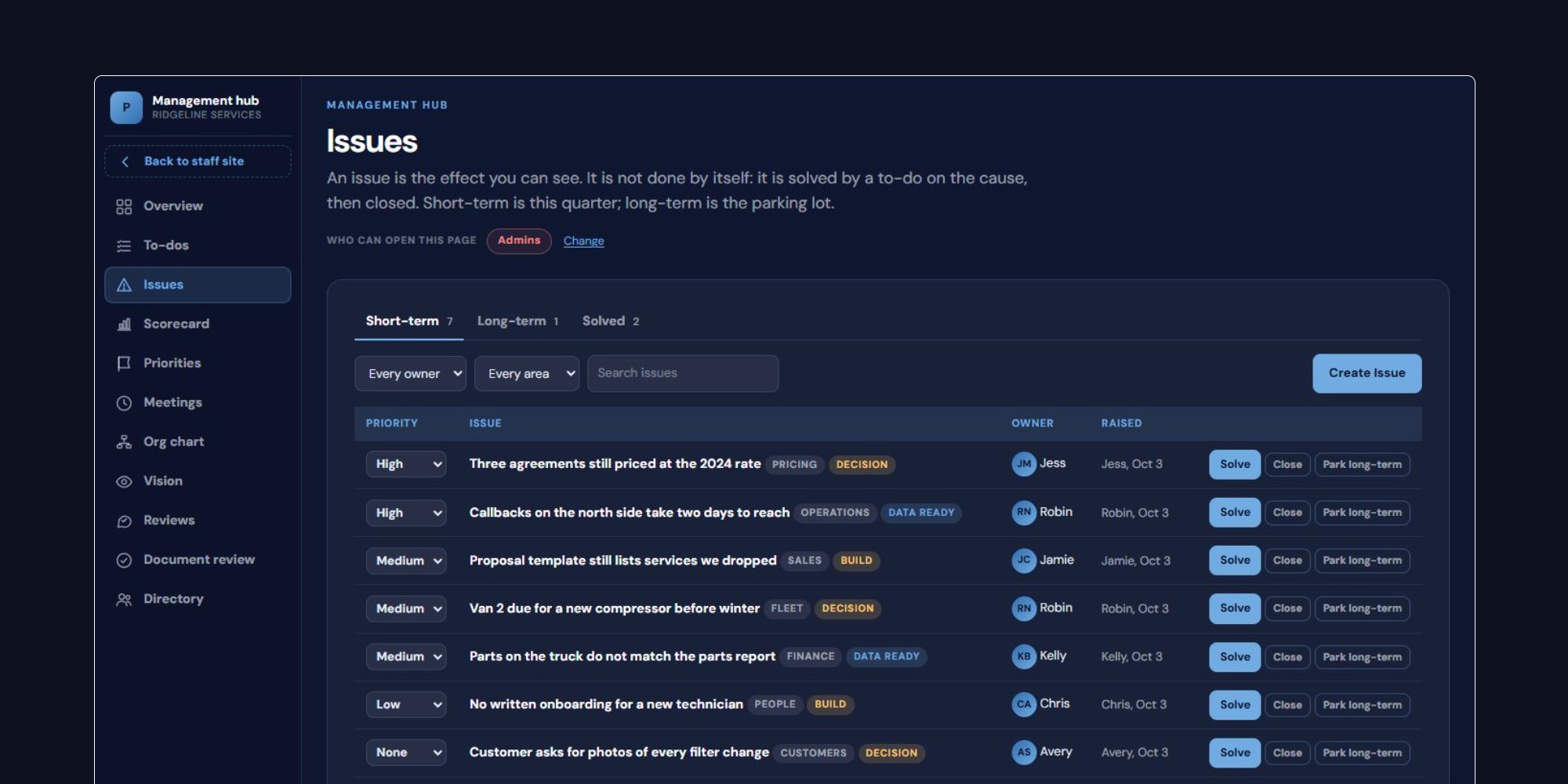
Problems keep coming back to the owner because nobody else is named on them. A company stops routing every problem through one person when it keeps two lists: an issues list that holds every open problem in one place, and a to-do list where each solved problem becomes a task with one owner and a date. At Prime Sweeping, an overnight parking-lot sweeping and day porter company in metro Atlanta, both lists live in the management hub of a staff site I built for the company. I am a partner there, and I sit on the board and serve as Chief Strategy Officer. This article covers how the two lists work, what goes on each, and what they leave behind.
Why problems default to the owner
In many owner-run companies, a problem belongs to whoever hears about it first, and then it travels. A crew lead mentions that a customer's gate code changed. The office manager hears a complaint about a missed island. A driver says the truck is pulling left. Each of those gets said out loud to someone, and since nobody was told it was theirs, it ends up with the one person everyone knows will act: the owner.
No one on the team is doing anything wrong here. Nothing in the company names another person as responsible for the problem, so it lands on the person who carries responsibility for everything by default. The owner then becomes the company's memory. They remember what was raised, who was supposed to call whom, and what never got done. When they take a week off, the problems wait.
That is the pattern a buyer looks for. A company that runs without the owner day to day is the single largest value driver we see, and a company whose problems all route through one person fails that test in plain view. I wrote about how that shows up in the price in why owner dependence lowers your sale price. The two lists below are one of the most direct ways to change it.
One list of every open problem
The issues list holds every open problem in the company, in one place. Anyone on the leadership team can add one. It can be filtered by area, so the operations lead can look at operations issues without reading through HR and sales, and each issue is tagged by what it needs to move: data, a decision, or something built.
Those three tags do more work than they appear to. An issue tagged "needs data" is not ready for a decision, and saying so stops the team from arguing about a guess. An issue tagged "needs a decision" has the facts and is waiting on someone with the authority to choose. An issue tagged "needs something built" already has its answer and is waiting on a form, a procedure, a tool or a change to a schedule. Sorting problems this way tells the team which ones can be settled in the room this week and which ones need homework first.
One list also ends a quieter problem: the same issue raised three times by three people in three places. When there is one list, the second person to notice a problem finds it already there, with an owner, and adds what they know.
How to write an issue that can be solved
An issue written as a complaint is hard to solve. "Customers are unhappy" or "the trucks keep breaking" describes a mood. Nobody can take that away and act on it. The issues that move quickly are written with enough detail that the person reading it knows what is wrong, where, and how anyone would know it is fixed.
In practice that means three things. Name the specific problem: which route, which account, which step in which process. Say what is known and what is not, which is usually what decides the tag. And say what a good outcome would look like, even roughly, so the conversation has somewhere to go. "Two properties on one route were missed twice this month because the lot was locked when the truck arrived; we do not know whether their hours changed" is an issue the team can work. It points at the locations list, where each property's time window is kept, and at a phone call to the customer.
A well-written issue is also shorter to discuss. Most of the time a meeting spends on a problem goes to figuring out what the problem actually is. Doing that when the issue is written, by the person who saw it, saves the whole team that time.
What solved means: one owner and a date
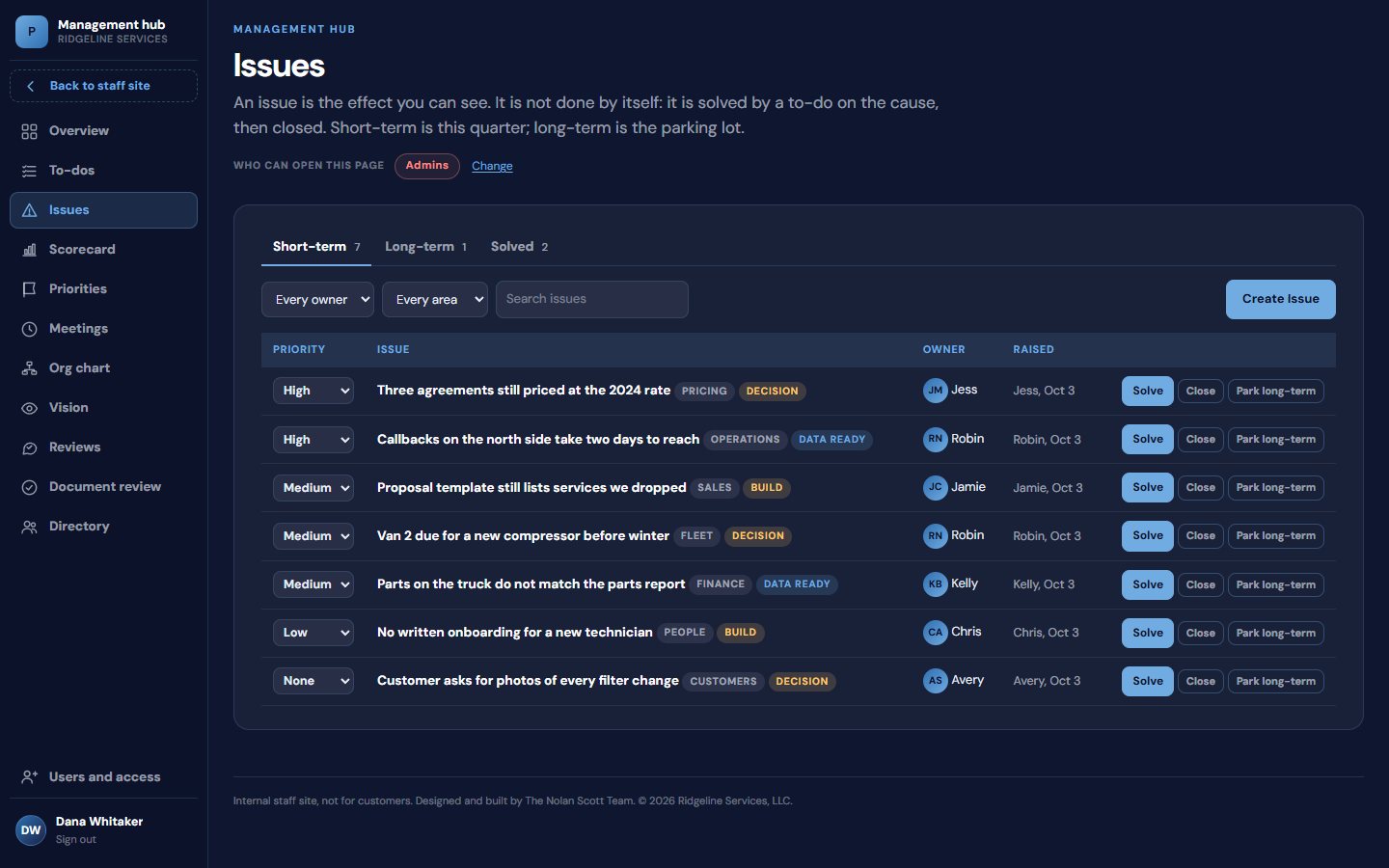
An issue is solved when it becomes a to-do with one owner and a due date. Agreeing on what should happen does not count, and neither does everyone nodding at the same idea. In the hub, solving an issue turns it into a to-do in one step, and the to-do carries the name of the person who will do it and the day it is due.
One owner matters because a task assigned to two people is a task each of them can assume the other has. A date matters because a to-do without one drifts until someone asks about it, and usually the someone is the owner. With both in place, the question "who is handling that?" has an answer on a screen that anyone on the team can read, and the owner stops being the person who has to remember.
Some problems need more than one task. That is fine: solve the issue into as many to-dos as it takes, each with its own owner and date. The issue itself leaves the open list, because its next steps now live somewhere they will be checked.
During the weekly meeting, the capture bar at the bottom of the screen adds an issue or a to-do without leaving the section the team is in. When a problem surfaces halfway through reviewing the numbers, it goes on the list in a few seconds and the meeting keeps moving. It is not lost, and it does not take over the agenda. Our article on running a weekly leadership meeting covers how the rest of that meeting is structured.
Parking a problem is different from dropping it
Not every issue belongs in this week. Some are real but long-term: whether to add a second yard, whether a service line should be priced differently, whether a role should be split in two. Working those every week crowds out the problems that have to be settled now, and deleting them means they come back later as someone's memory, usually the owner's.
The hub handles this by parking long-term issues. A parked issue leaves the weekly list but stays in the system, with its history, where the leadership team will find it when it is time to plan the next quarter. The difference between parking and dropping is where the problem lives afterward. A dropped problem lives in someone's head. A parked problem lives on a list that gets reviewed.
That distinction lets a team be honest about its capacity. It can say "not this quarter" about a good idea without pretending the idea went away, and nobody has to keep raising it to make sure it is not forgotten.
Three to-do lists, and why two of them are closed
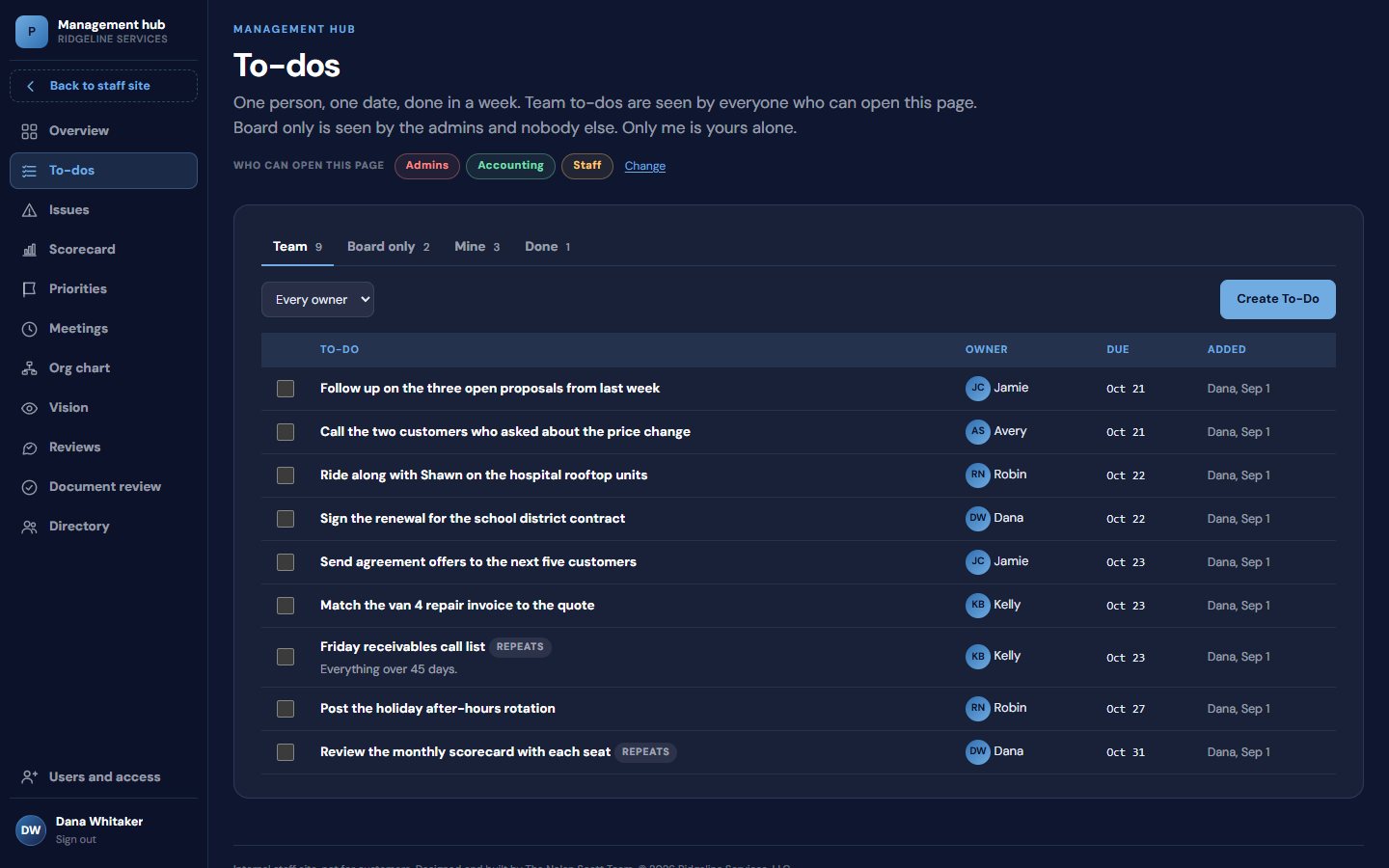
To-dos sit on three lists: team, board-only and private.
The team list is the default. It holds the work that came out of the weekly meeting and anything else the leadership team should be able to see: who owes what, by when. Most to-dos belong here, because visibility is what makes follow-through happen without the owner chasing it.
The board-only list exists because some work should not be visible to the whole leadership team. A company with partners or a board has matters that belong to the owners: a question about the operating agreement, a compensation decision, a conversation with a lender, the early stages of a sale. Those still need an owner and a date, and they deserve the same follow-through. Putting them on a separate list gives them that discipline without making them public inside the company.
The private list is for the individual. Every manager has small commitments that do not need an audience, and if the only list is the team list, those end up on sticky notes and in inboxes. A private list keeps a person's whole workload in one place, which makes it more likely they will actually use the system instead of keeping a second one on the side.
Repeating to-dos for routine obligations
A lot of what an owner carries is not a problem at all. It is routine: the obligations that come around every week or every month and quietly depend on one person remembering them. In the hub these are repeating to-dos. When a repeating to-do is ticked off, the system creates the next one with the next date, so the Friday receivables call happens every Friday, whoever is making it and whether or not anyone thinks to ask.
This is the smallest feature on the two lists and one of the most useful for moving work off the owner. Routine obligations are exactly the tasks that live in the owner's calendar or in their head, because nobody else was ever named on them. Writing each one down once as a repeating to-do with an owner is often the fastest way to find out how much of the week really requires the owner, and how much only required someone to remember.
It also pairs with written procedures. A repeating to-do says who does the task and when. A procedure says how. Together they let a new manager pick up a recurring duty in a week. Our article on the written procedures buyers expect covers the second half.
The follow-through record the lists leave behind
Each week, last week's to-dos come back in the meeting as done or not done. There is no discussion of why at that point, just the status. Anything not done either gets a new date or becomes an issue of its own. Over a few months that produces something most owner-run companies do not have: a written record of what the team said it would do, and whether it did.
That record is useful to an owner who plans to keep the company and grow it. It shows which managers close their commitments and which let them slide, which areas keep generating the same problems, and whether the weekly meeting is producing work or only conversation. None of that depends on the owner's impression.
It is also useful to an owner who plans to sell. A buyer, a lender or a buyer's accountant can ask how problems get handled when the owner is not around, and the answer can be a list, with names and dates, going back months. That is harder to argue with than an assurance in a management presentation, and it speaks directly to whether the company runs without its owner.
Where to start
You can start both lists on a shared spreadsheet this week: one tab for open issues with a tag for what each needs, one for to-dos with one name and one date per row. What makes it hold is using it every week, in the meeting, until the team brings problems to the list instead of to you. You can see how the issues and to-do screens fit into the rest of Prime's management hub on What We Built.
If you want help building this into your company, as part of a larger effort to make it run without you, that is the work described on our consulting page. I am glad to talk through where your week goes and which problems would move first. You can book a time here.